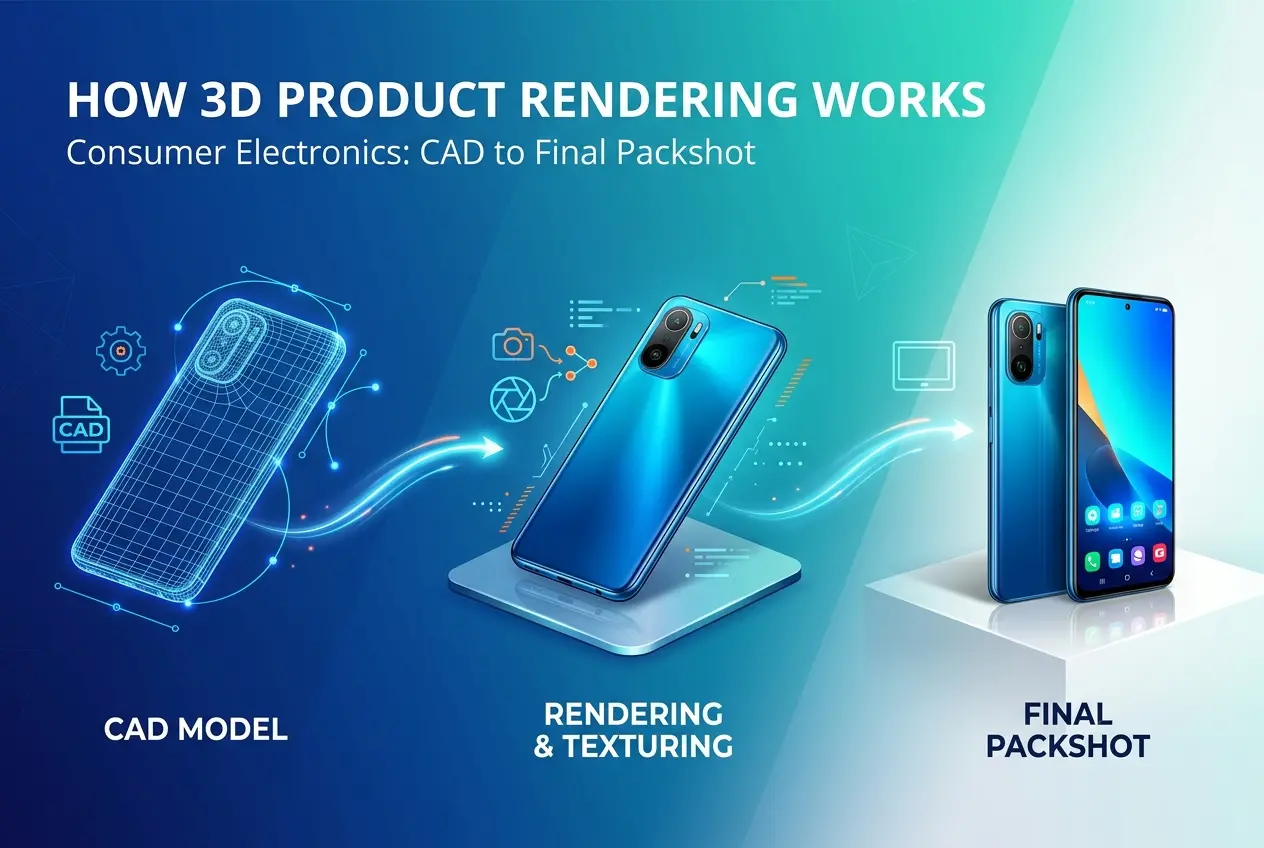
Consumer electronics is one of the most demanding categories in 3D product rendering — and if you’ve ever wondered exactly how 3D product rendering works for consumer electronics: from CAD to final packshot, you’re asking the right question. The stakes are high. A smartphone render that looks plasticky, a wireless earbud with muddy surface detail, or a laptop with flat, unconvincing materials can quietly kill a product launch before a single unit ships. In our studio, electronics projects make up a significant portion of our work, and they require a completely different approach from, say, furniture or architectural visualisation. The geometry is tighter, the materials are more complex, and the client’s brand guidelines are usually non-negotiable.
Most brands don’t have the luxury of waiting for physical samples before they need marketing imagery. Product photography of electronics is expensive, time-consuming, and inflexible — if the colour changes, you reshoot. If the product hasn’t arrived yet, you wait. 3D rendering eliminates both problems entirely. But to use it well, you need to understand what actually happens between receiving a CAD file and delivering a final hero image or packshot. That’s what this post is about.
The Starting Point: What We Actually Need From You
Everything begins with geometry. For consumer electronics, this almost always means a CAD file — typically STEP, IGES, or SolidWorks format — exported from the engineering team’s product design software. These files are built for manufacturing precision, not rendering. They contain exact measurements, boolean operations, and mechanical assemblies. They are not, however, optimised for a render engine.
The first thing we do is import the CAD data into a 3D application — usually Cinema 4D, 3ds Max, or Blender depending on the project — and convert that precise engineering geometry into polygon meshes. This process, called tessellation, is where you make your first important decisions. Too low a polygon count and curves look faceted — you’ll see hard edges on what should be a smooth bezel. Too high and the file becomes unmanageable. For electronics, we typically err on the side of higher density because the camera is often very close to the product.
We’ve had clients send us files missing entire internal components that show through transparent parts — a common issue with wireless earbuds that have visible charging contacts or semi-transparent housings. We’ve also received files where the industrial design and the engineering CAD diverged slightly during development, meaning the render file needed to be corrected against the latest physical spec. Always share the most current CAD revision, and flag any areas where the physical product differs from the file.
How 3D Product Rendering Works for Consumer Electronics: Material and Surface Setup
Once the geometry is clean, the real craft begins: materials. This is where most of the visual quality is won or lost. Consumer electronics involve a specific and challenging set of surface types:
| Surface Type | Common Products | Rendering Challenge |
|---|---|---|
| Anodised aluminium | Laptops, audio hardware, cameras | Directional micro-scratches, subtle colour shift |
| Soft-touch matte plastic | Earbuds, remotes, chargers | SSS-like softness without being translucent |
| Tempered glass | Smartphone screens, smartwatch faces | Reflectivity vs. clarity balance, oleophobic coating look |
| Gloss polycarbonate | Housings, bezels | Avoiding over-specular blow-out |
| Fabric or mesh | Smart speakers, headphone pads | Displacement vs. geometry-based weave detail |
| LED / OLED displays | All screen-based devices | Emission maps, parallax, reflection management |
We use physically based rendering (PBR) workflows for all of this, which means materials behave according to real-world light physics. Roughness, metalness, index of refraction, subsurface scattering — each parameter is dialled in by referencing actual physical samples or product photos provided by the client. If you can send us a physical sample or a few reference photos shot under daylight, it shortens material development considerably.
Display screens deserve special mention. A switched-off screen with a pure black emission map looks dead and unconvincing. We composite a screen UI — either provided by the client or designed to brief — with carefully controlled emission values and a subtle reflection layer on top that mimics the glass panel. Getting that right is what separates an electronics render that reads as real from one that reads as a visualisation.
Lighting: The Environment Your Product Lives In

Lighting for electronics packshots is not the same as lighting for architectural or interior renders. The goal here is controlled, repeatable, brand-accurate light — the kind you’d achieve in a professional photography studio with a cyc wall, large diffusion panels, and careful flagging to avoid spill.
We typically use HDRI environments as a base, then layer in area lights and negative fill cards to sculpt the final look. For white packshot backgrounds — the standard format for e-commerce and retail — the setup aims for a perfectly clean white ground with no visible shadow, or a controlled soft drop shadow, depending on the brief. For hero images and lifestyle packshots, the lighting shifts toward mood and environment storytelling.
One thing clients consistently underestimate is how much the lighting angle reveals or hides surface imperfections in the product model. Anodised aluminium looks completely different under a large overhead softbox versus a small point source. We always test lighting across multiple angles early in a project and share previews before committing to a final direction.
Camera Setup and Composition
Electronics packshots typically fall into a few standard compositions: front-facing flat lay, three-quarter perspective view, in-use lifestyle angle, and technical exploded view. The choice depends entirely on what the image needs to communicate.
Camera focal length matters enormously at this scale. Wide lenses distort the product — a smartphone shot at 24mm equivalent will look slightly warped and unnatural. We typically use 85mm to 135mm equivalents for tight packshots, which flattens perspective and matches how the product actually looks in real studio photography. When we’re matching a render to an existing photo asset, we sometimes use camera matching tools to recreate the exact lens and position of the reference shot.
Depth of field is another area where clients often push for creative effects that actually hurt the image. For most e-commerce packshots, everything should be in sharp focus. Selective blur works well in lifestyle or campaign imagery, but if the buying decision depends on seeing the product clearly, keep it sharp.
From Raw Render to Final Packshot: Compositing and Post

The render engine output is the starting point, not the final image. We always render in linear colour space with a high bit depth — typically 32-bit EXR — and split the render into multiple passes: beauty, diffuse, reflection, shadow, specular, and so on. This gives us the flexibility to adjust individual elements in compositing without re-rendering the entire frame.
Post-production for electronics typically involves colour grading to match brand guidelines, background compositing (especially for white packshots), screen compositing to drop in UI imagery, and sometimes adding environmental reflections or props. Dust and micro-scratch imperfections are occasionally added at this stage too — not to make the product look used, but to add photographic realism that renders alone tend to lack.
If you need the imagery to match existing photography already in market — a family of product shots that your new model needs to sit alongside — we’ll need those reference images early. Matching colour temperature, shadow quality, and lighting direction across real and rendered images is a specific skill, and it’s much easier when we have all the reference material upfront rather than late in the process.
What Clients Get Wrong (And How to Avoid It)
Understanding how 3D product rendering works for consumer electronics from CAD to final packshot also means knowing where projects slow down or go sideways. Here’s what we see most often:
- Sending old or provisional CAD files. If the file doesn’t match the production unit, the render won’t match the product. Lock down the geometry before brief kickoff.
- No brand colour reference. “Midnight blue” means something different to everyone. Always share Pantone, RAL, or measured colour values from the product specification.
- Late screen UI delivery. The screen compositing is one of the last stages of the process. If you haven’t finalised your UI yet, flag it early so we can plan the timeline accordingly.
- Expecting photography-equivalent turnaround. A detailed electronics render — especially for a multi-SKU product family — requires days of material development and iteration. Budget the time properly.
- Approving renders on uncalibrated screens. If your team is reviewing on a standard laptop in a brightly lit room, the colours you’re approving won’t match what’s delivered. We always recommend calibrated monitor review for final sign-off.
Formats and Deliverables
A typical electronics rendering project delivers a range of outputs: high-resolution TIF or PNG files for print and packaging, web-optimised JPEGs or WebP for e-commerce, sometimes 360° spin sequences for interactive product viewers, and occasionally animated product videos for launch campaigns. We structure the file delivery so that every final asset is clearly named, resolution-labelled, and colour-profile tagged — usually sRGB for screen use and Adobe RGB or CMYK profiles for print.
If you’re building a product page that needs both packshots and 360° views, it’s worth planning both as part of the same project rather than commissioning them separately. The model, materials, and lighting built for the packshots are largely reusable for the spin sequence, which saves significant time and cost.
Understanding how 3D product rendering works for consumer electronics from initial CAD data through to a polished final packshot is the difference between briefing a project confidently and getting unexpected results. The process has clear, logical stages — each one building on the last — and the quality of what you put in at each stage determines what you get out at the end. If you’re planning a product launch and want to discuss your rendering requirements with our team, get in touch with us at 360render.com and we’ll walk you through exactly what your project needs.
Frequently Asked Questions
What is the difference between CAD files and 3D product rendering for consumer electronics?
CAD files are technical engineering blueprints that contain precise measurements and geometry data used for manufacturing, while 3D product rendering transforms those files into photorealistic visuals optimized for marketing and retail use. The rendering process adds materials, textures, lighting, and environments that make the product look as though it was captured in a professional photo studio. This distinction means manufacturers can create stunning packshots and lifestyle imagery long before physical samples are even produced.
How long does the 3D rendering process take for a consumer electronics product like a smartphone or laptop?
The timeline for rendering a consumer electronics product typically ranges from 3 to 10 business days depending on the complexity of the device, the number of angles required, and the level of photorealistic detail needed. Simple products with existing CAD files and straightforward materials like flat plastic surfaces move faster, while devices with intricate textures, reflective screens, or multi-component assemblies take longer to model and refine. Rush projects can sometimes be delivered in 24 to 48 hours at an additional cost through specialized studios.
What file formats are needed to start the 3D product rendering process for electronics?
Most 3D rendering studios accept CAD formats such as STEP, IGES, SolidWorks, or Rhino files as the primary source geometry for consumer electronics projects. If CAD data is unavailable or under NDA restrictions, studios can also work from reference photos, technical drawings, or even physical product samples to build geometry from scratch. Providing brand guidelines, Pantone color codes, and material reference images alongside the CAD files ensures the final renders accurately reflect the intended product design.
How much does professional 3D product rendering cost for consumer electronics packshots?
Professional 3D rendering for a single consumer electronics hero packshot typically costs between $300 and $1,500 per image depending on scene complexity, studio reputation, and turnaround requirements. A full product launch package including multiple angles, lifestyle scenes, color variants, and animated views can range from $2,000 to $15,000 or more for flagship devices like smartphones or gaming peripherals. While the upfront investment is higher than basic photography in some cases, 3D rendering eliminates costly reshoots, allows infinite color variant updates, and delivers assets before physical production is complete.
Can 3D product rendering replace traditional product photography for e-commerce and retail listings?
Yes, 3D product rendering has become a widely accepted replacement for traditional photography across major e-commerce platforms including Amazon, Best Buy, and consumer electronics brand websites, with many retailers now unable to distinguish rendered images from real photos. Leading consumer electronics brands such as Apple, Samsung, and Sony routinely use CGI packshots for their official marketing materials because rendering offers greater control over lighting, angles, and environment than a physical photo shoot. The consistency and scalability of 3D rendering make it particularly valuable when launching multiple SKUs, colorways, or regional packaging variations simultaneously.
Also read: HDRI vs Studio Lighting in 3D Product Rendering: Which Setup Wins for E-Commerce Packshots